For a lot of content creators, AdSense remains the main money-maker and in many cases, the biggest source of anxiety as well. CPMs can do a wild swing one month, RPMs can tank when it’s out of season, and even the most stable channels can still be affected by low income from month to month. It’s no wonder why YouTube Channel Memberships can be legitimately included in YouTube trends 2026 and why many creators are gravitating towards it as a way to build a steady, guaranteed income that comes directly from the fans who are most into their content.
In this guide, we’ll be taking a closer look at how to get the most out of YouTube channel memberships this year, what kinds of earnings you can realistically expect to see, what kind of perks do viewers actually pay for, and when it’s a good idea to launch memberships and when it’s not. You’ll get to see the not-so-obvious mistakes to watch out for, some real-life revenue examples, and a practical step-by-step setup for getting started. Of course, this won’t make you a billionaire overnight, but it’ll help you to make the most of it and influence the stability of your overall income.
YouTube Channel Membership Explained
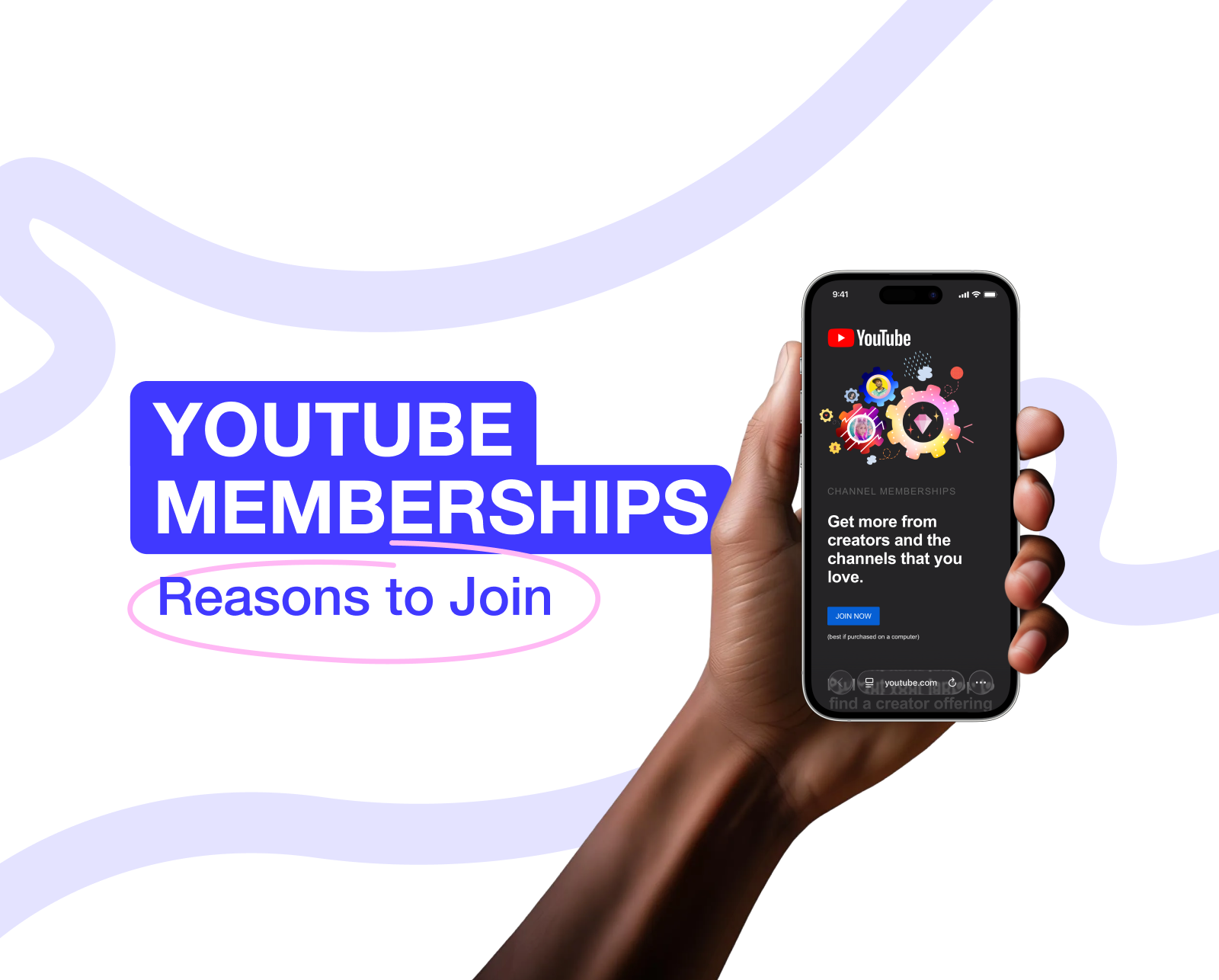
A YouTube Channel Membership is a paid subscription that lets viewers contribute on a regular basis to support a creator. This gets them some pretty nice perks in return, and unlike ads or a one-time donation, memberships give creators a steady stream of income from fans who are truly invested in the channel.
Channel memberships are part of YouTube’s broader fan funding setup and are open to creators who meet certain requirements. Once they’re turned on, viewers can sign up to join the channel itself, for a set monthly fee that can vary depending on the type they choose — sometimes, YouTubers can offer different types of memberships depending on the price.
At its heart, YouTube membership monetization comes down to a simple idea: turning viewers who show up regularly into people who come back month after month.
How YouTube Memberships Work for Creators and Viewers
For creators, memberships give them a straightforward way to earn money from their biggest fans without needing to go through other platforms in the process. Let’s review perks for both sides of the business.
| **Creators get:** | **Viewers get:** |
| A steady monthly income where all the billing and payouts are taken care of right inside YouTube | A feeling of being part of a community surrounded by fellow fans and a creator in the center of it all |
| Some built-in tools to help promote memberships natively (like a join button and some custom emojis and badges) | Exclusive stuff that non-members don’t have access to |
| Access to some useful membership stats and data on how well it’s all working out | A way to show real support for the creators they care about |
Some common things creators sell to their members usually include:
- A membership badge that shows up next to your username every time you comment;
- Some special emojis that you can use in the comments and live chat;
- Posts that are only visible to members of the community;
- Live streams that are only available to people who are signed up as members;
- Early access to special content or even some exclusive videos.
The main difference between memberships and donations or tips is that members are in it for the long haul. And this easy and accessible system helps YouTubers keep people on board.
Step by Step Setup Guide to Add Membership to Your Channel
Setting up a channel membership on YouTube doesn’t have to be complicated, but having a solid plan does make a big difference. So, here are the basics:
- Check if you qualify — go to YouTube Studio and verify your eligibility;
- Turn on membership in your YouTube settings;
- Create some membership options and set your prices;
- Get your branding in order — upload your channel’s badges and some fun custom emojis;
- Decide on the types of content you’ll be sharing with your members;
- Come up with a clear membership announcement that’ll get people excited and attracted.
Once it’s time to get your monthly revenue, you can choose what type of YouTube withdrawal method is best for you. Many people prefer not to overburden themselves with a whole strategy of extracting money, which is why they use the MC Pay app that simplifies the overall processes.
It’s just as easy from the viewer side of things:
- They just click that Join button on your channel;
- Pick a membership tier that suits them;
- Then they just pay up via YouTube each month.
And if you take the time to explain how to get a membership on YouTube, your viewers will be way more likely to join in.
YouTube Channel Membership Eligibility and Requirements
While channel memberships can seem like a pretty straightforward addition to your YouTube channel, they’re actually tightly tied into the whole YouTube monetization methods and content policies system. If you don’t get a handle on these requirements early on, you could be in for some frustration, like seeing that “YouTube membership is not available” message for no apparent reason, even after you've reached YouTube monetization criteria.
At the end of the day, channel memberships are part of YouTube’s fan funding arrangement, which is the same system that includes Super Chat, Super Stickers, and Super Thanks. This means that eligibility comes down to building trust with the platform, being compliant, and being ready to monetize.
What’s with the Core Requirements?
To get to the point where you can add channel membership, you’ll need to check off the followingbaseline fan funding conditions on YouTube:
- You need to be accepted into the YouTube Partner Program (YPP)— check the YPP requirements beforehand
- The person in charge of the channel needs to be at least 18 years old
- The creator needs to agree to YouTube’s monetization terms and policies
- The channel has to be based in a country where channel memberships and all the other fan funding features are available
Now, you’re probably thinking, “I've got all that done, what's the next step?” Well, it gets a bit trickier from here. To qualify for channel memberships, you need to meet all of the following conditions beyond just being in the YPP:
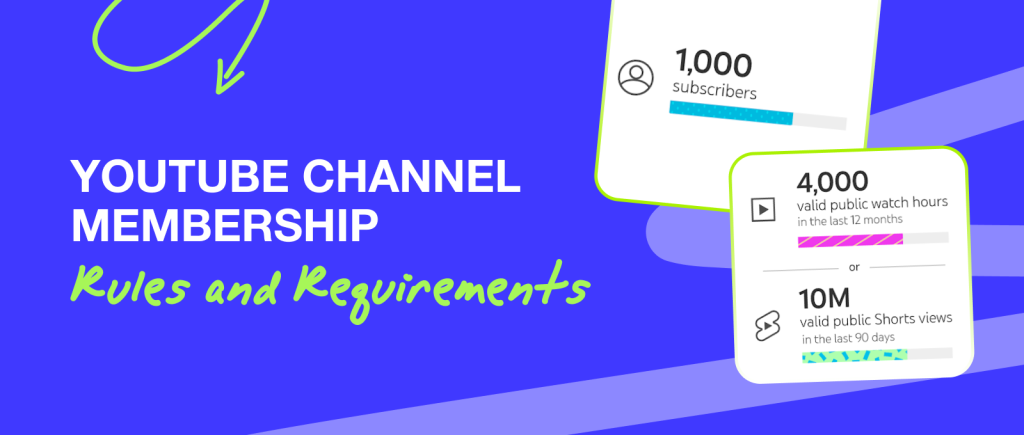
- Your channel needs to have more than 1,000 subscribers
- You need to meet one of two activity benchmarks: 8,000 valid public watch hours in the last 12 months or 20 million valid Shorts views in the last 90 days
- You can’t make a channel that’s marked as “made for kids” or have a bunch of your videos labelled as “made for kids”
- Your channel can’t rely too heavily on videos with claimed (copyrighted) music
These criteria are in place to make sure that you have a channel that has a consistent stream of audience engagement, ownership of your content, and an adult or general audience.

Learn more
Want to Grow Faster on YouTube? Get a free channel audit from Mediacube experts. Identify what’s holding you back and receive a clear action plan to boost your growth. [Get a Free Audit](https://mediacube.io/form?page=&form=welcome)
[Get a Free Audit](https://mediacube.io/form?page=&form=welcome)Why Memberships Don't Always Appear — Even if You are Monetized
Here's the thing, just because you’re monetized doesn’t mean memberships will just magically emerge for you. There are plenty of reasons why this might not happen:
- You’ve got recent or unresolved policy strikes
- A high percentage of your videos are marked as “made for kids”
- Your content has a lot of licensed music claims
- There are regional limitations tied to fan funding availability
- You just haven’t been following YouTube’s membership guidelines
So never think that all that happens is due to the disinterest of your audience. It's because of your content and compliance issues, which you can fix. One thing to keep in mind with membership perks is that they have to be fair, scalable, and platform-native. You can’t offer things like 1:1 meetings or private consultations, or run contests and giveaways that are only available to select members. That’s all about protecting users and keeping things running smoothly across YouTube.
In September 2024, YouTube launched Communities, a Discord-like space built directly into creator channels. But remember that communities and memberships are two different things. Communities are all about engagement and discussion, while memberships are about monetization and exclusive access.
Speaking about Money: How Much Is a YouTube Membership
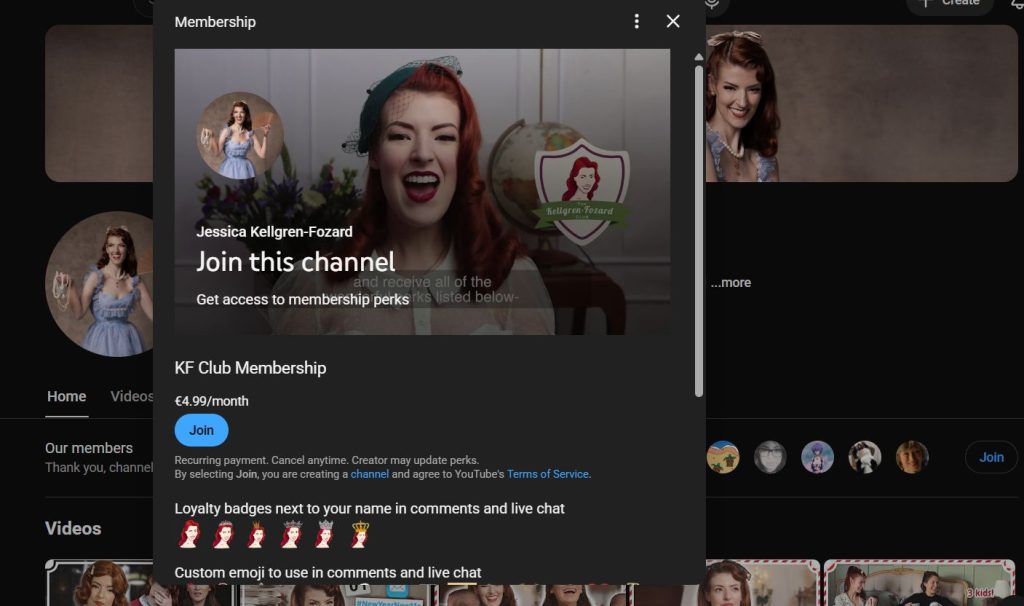
- Jessica Kellgren-Fozard
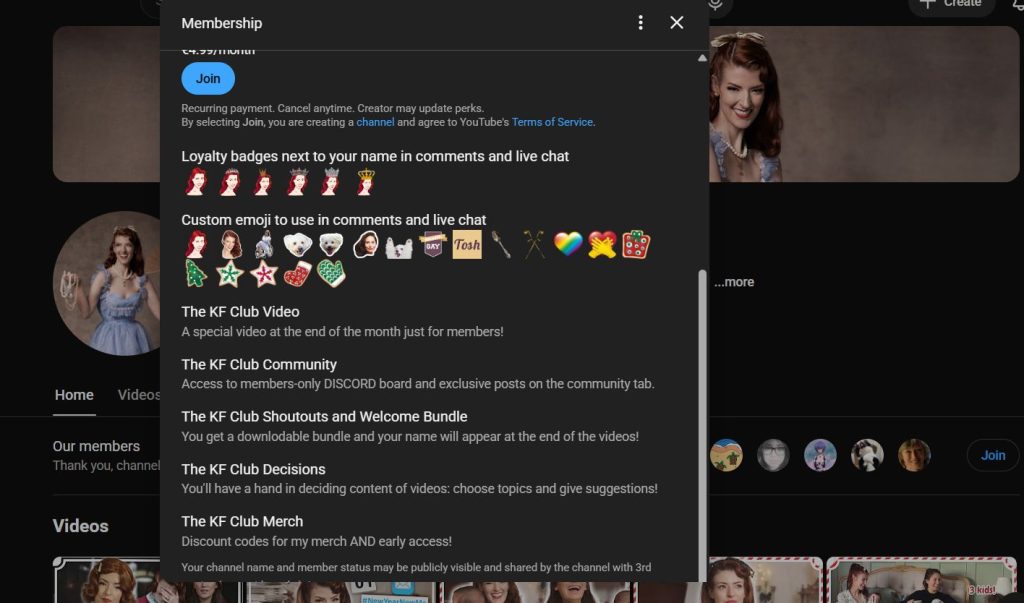
- Jessica Kellgren-Fozard
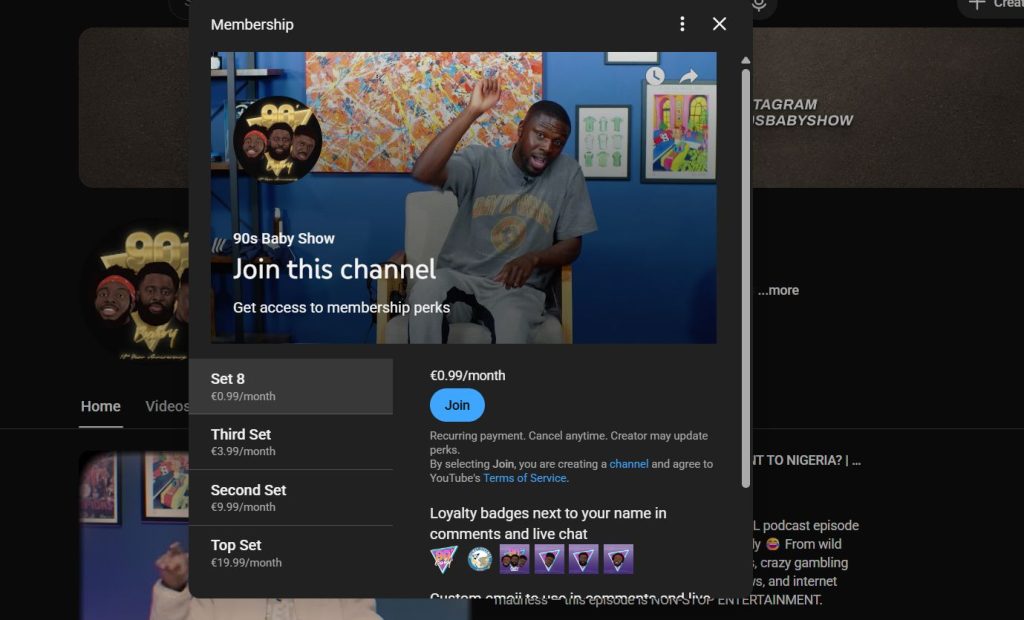
- 90s Baby Show
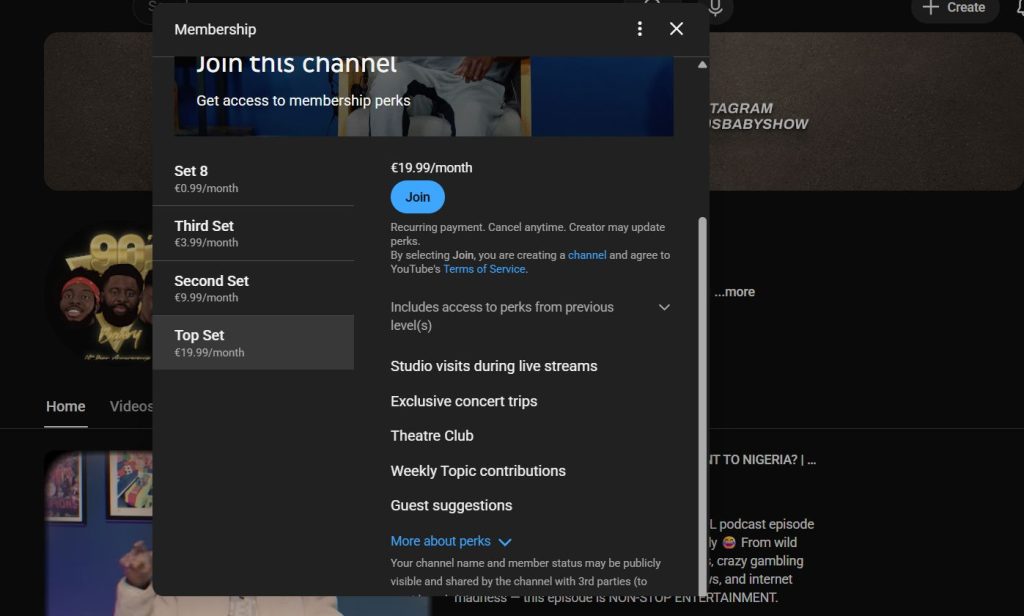
- 90s Baby Show
Examples of tier options different creators offer - Jessica Kellgren-Fozard and 90s Baby Show
Unlike ad revenue from YouTube, channel memberships give creators a lot more control over how much they can charge, but only if they’re not completely out of touch with what their audience is willing to pay and whether it actually brings in a decent income. A YouTube membership is a monthly subscription, and the creator gets to decide how many pricing tiers they want to offer and what goodies you get for each one.
It’s really up to the creator to decide where they want to position their tiers within those limits. That’s why channels in the same niche can charge vastly different prices and still do just fine. The price ultimately comes down to what your audience is willing to pay and how loyal they are.
When you’re trying to estimate revenue, there are a few key things to keep an eye on:
- The conversion rate — how many subs actually end up paying for a membership (usually around 1-5%)
- YouTube’s cut, which is 30% of the income
- How long people stick around for, or the life of a member
Even with a pretty modest conversion rate, memberships can quickly catch up to ads in terms of stability, especially if you’ve got a community behind you so strong that you are either thinking of beginning to produce merch or already doing it.
Since YouTube takes 30% of all membership revenue, creators are left with 70% of the sum their members pay each month. Many of them stick with three common membership tiers by default:
- Tier 1: $4.99 a month — a creator gets $3.49
- Tier 2: $9.99 a month — a creator gets $6.99
- Tier 3: $24.99 a month — a creator gets $17.49
To get an idea of how much you can expect to rake in each month, start by counting the number of subscribers you have, then use a conservative conversion rate somewhere between 1% and 5% (this is a pretty standard range for memberships). Let's say you've got 50,000 subscribers, 2% of them sign up to the Tier 1 level. That's 1,000 members paying $3.49 each, so you can count on about $3,490 per month.
There are many creators who copy someone else’s pricing strategy without truly understanding their own audience. Just because someone else is charging more for a membership doesn’t mean you should do the same. Higher prices don’t guarantee higher revenue, and charging too little can make your membership seem pretty cheap.
When you get pricing right, YouTube channel memberships become a reliable way to bring in a steady income in addition to what you already have. You can calculate your YouTube channel earnings to check and analyze the overall statistics of your income, plan further strategy accordingly, and make a decision about membership.
Best YouTube Membership Perks That Fans Actually Pay For
The effectiveness of a YouTube channel membership in reality has very little to do with the number of perks being offered (badges and all). Perks tend to be most effective when they reinforce emotions. Let’s dive into exploring those perks closer.
To the average viewer, a YouTube membership is a way to participate in something more and be a part of a community. The things people are looking for aren’t rocket science, they just want:
- Access — a more direct way of interacting with the creator through live chats, comments, or Q&As;
- Recognition — visible proof that they’re a member with their own badges or emojis to show off;
- Belonging — to be part of a group, a special little club that has its own space;
- Exclusivity — to get early access or exclusive access to things or gated posts that make membership feel like an exclusive club, and those things are unavailable for non-members.
Perks Which Work Without Causing Burnout
One thing that typically won’t end well is creating membership perks that ask too much from the creator. Yes, it’s something you need to consider as well. It can feel like pressure to be expected to create new, complex things that end up being impossible to keep up with, which will inevitably make members feel shortchanged and just want to leave.
Perks that build on the existing content flow are simple and just add to what’s already there, tend to be much more practical, like:
- Private, relaxed membership-only live streams
- Polls, updates, and other community posts
- Early access to new content that just naturally gets posted anyway
- Members-only comment sections or pinned replies
These things tend to scale naturally with your channel’s growth, making it possible to maintain consistency without sacrificing quality or taking a significant toll on your mental health.
YouTube Memberships vs Other Platforms
While it’s tempting to compare YouTube memberships to external platforms like Patreon or Ko-fi, they do serve a slightly different strategic purpose. Below, you can see the illustrative comparison of three of the most popular ways of arranging memberships for your fans that can bring you income.
| **Feature** | **YouTube Channel Membership** | **Patreon** | **Ko-fi** |
| **Platform integration** | Native to YouTube | External platform | External platform |
| **Audience friction** | Very low (one-click join) | Medium (account + redirect) | Medium (account + redirect) |
| **Visibility via content** | High (Join button, live chat, badges) | Low | Low |
| **Best use case** | Monetizing loyalty inside YouTube | Casual support | Casual support |
| **Scalability** | High for community-driven channels | High but requires audience migration | Medium |
| **Setup complexity** | Low | Medium | Low |
| **Pricing** | Default + custom | Default + custom | Default + custom |
For most of us, starting with memberships on YouTube is a good idea. It gives you a simpler setup and minimizes the risk of losing viewers to another platform. Exterior platforms can come in handy later, but it's better to start simple.
Common YouTube Membership Mistakes Creators Make
Even the channels with the most engagement can struggle if they position their memberships wrong. So here are some common mistakes to watch out for:
- Setting your prices without making it clear what the buyer gets for their money;
- Treating memberships as some kind of content obligation and not a way to support the channel;
- Ignoring the fact that people bought a membership and just let it be without making an effort to sustain members’ interest;
- Failing to promote the feature seriously and expecting viewers to magically figure it out for themselves.
The successful channels present memberships as a means to pave the way for the channel’s future, with perks acting as a nice little bonus next to its main uniting goal. The question of membership can also be handled by services for YouTube promotion that can assist with content planning, its creation, and all the ways to engage and retain your members. These services make your life easier, and you don’t have to spend time thinking about how to manage both planning, creative processes, and technical stuff.
Frequently Asked Questions on YouTube Membership
If you still haven’t decided whether you need to launch the membership for your audience and are unsure about the mechanics, we’ve compiled several questions to help you sum it all up.
What is channel membership?
A YouTube channel membership is a monthly subscription that provides exclusive stuff and puts money (70% of total earnings, that is) directly into the pockets of the people who are making the content.
How much does YouTube take from memberships?
What YouTube takes when it comes to membership subscriptions is basically a cut, in the form of a revenue share of 30%. That means the creator gets a percentage of the cash (70%) that comes in each month. For example, that way, even the YouTube live streaming revenue split will be more profitable for a creator when it’s bound to a membership.
Can small channels use memberships?
Yes! If channels meet YouTube’s membership requirements, they can start charging for exclusive content. A lot of smaller channels have really made it work with their really engaged audiences.
How do memberships work on YouTube?
You click the Join button and select the suitable tier in case of options. Viewers pay a monthly fee, and in return, the creator gives them access to exclusive community content and gated materials.
How much can you earn with a YouTube channel membership?
It all depends on a bunch of factors: how big your audience is, how many of them actually end up subscribing, what you're charging for these memberships, and how well you keep people from cancelling after the first month.
Is YouTube Channel Membership Worth Launching in 2026?
YouTube Channel Memberships do offer valuable things — the possibility of a regular income stream and a stable, loyal fan base. While ad money and brand deals can be all over the map, memberships reward those who take the time to build long-lasting trust with their audience and create a real sense of community.
And even if your conversion rate is quite low, you can still build a stable revenue stream from those recurring payments. The problem is that memberships only fly when your audience knows what they are getting in return for their cash. Launch them too early or without putting in the effort to engage with your viewers, and you’re unlikely to see significant results.
For creators seeking direction on how to plan a solid monetization strategy and figure out everything from payouts to long-term growth, having a partner like Mediacube on hand can significantly simplify the process. Memberships can actually help to strengthen both your relationship with your audience and your revenue.